Features
Everything built in
The editor you already know how to use, with an AI agent that is part of it — not a plugin you set up afterwards.
Not one assistant. A whole team.
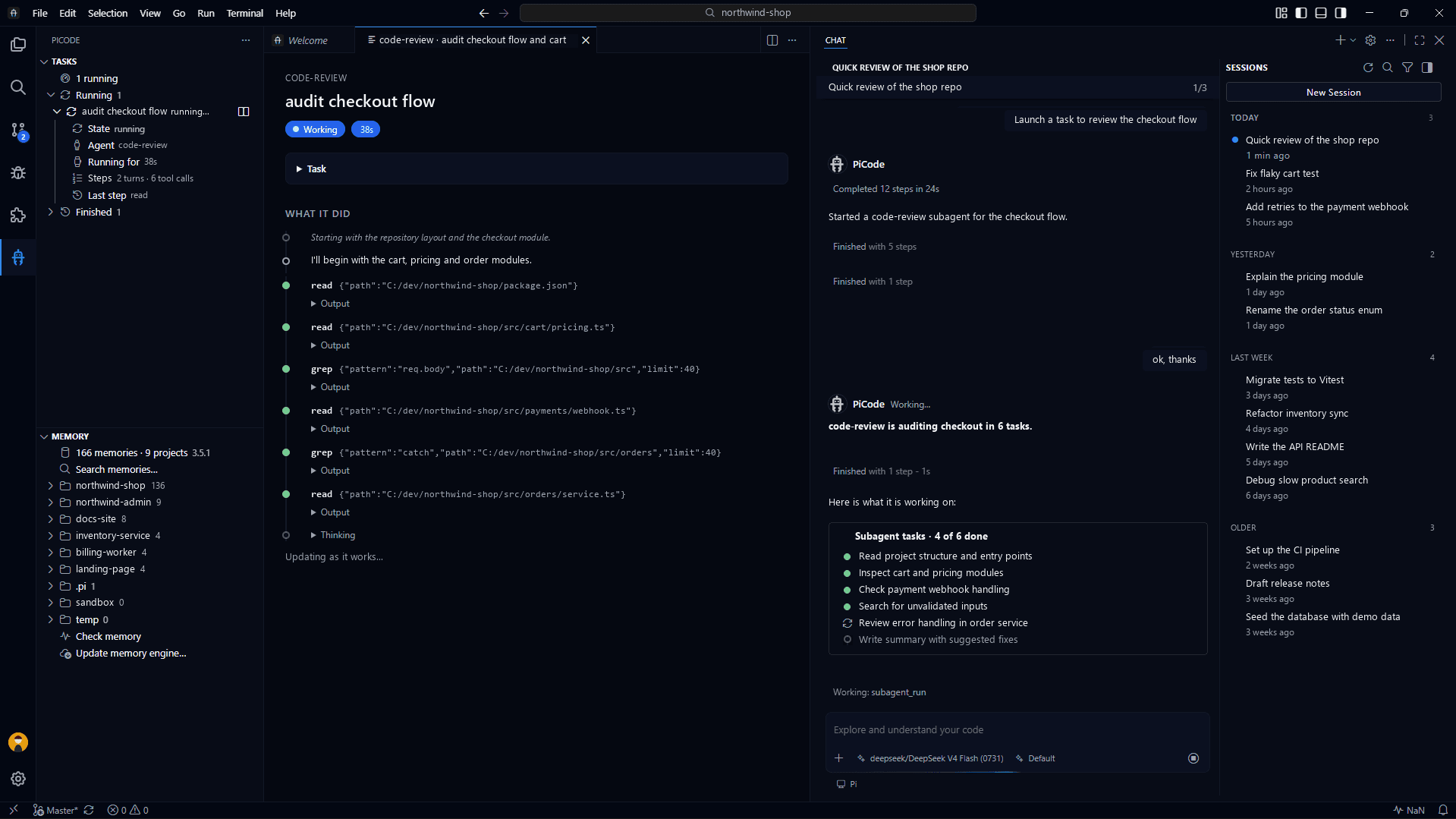
For bigger jobs, PiCode hands the work to a small team of specialised helpers that explore, build, check and review — while you stay in charge.
A memory that lasts. It remembers the decisions that matter in each project, so you don't repeat yourself tomorrow. That memory lives on your machine and is shared with your other agents.
Each helper, your way. Pick the model, the personality and what each helper is allowed to do.
Watch them work. Every helper shows up in Tasks with the phase it is in, and you can follow it live.
- Explorer
Looks around your project and the web before anything changes.
- Builder
Makes the changes you asked for, step by step.
- Checker
Double-checks that the result actually works.
- Reviewers
Four second opinions: risk, reliability, resilience and readability.
Your agent
Built into the editor, not bolted on. It knows your providers, your memory and your skills from the first launch.
Agentic chat, built in
Streaming answers with your project as context. It reads your code, edits files and runs commands on its own, and you see every step in the chat.
Watch it think
No hidden spinner. Its reasoning streams in the open, every command it runs gets a card with the exact input, and one dropdown sets how hard it thinks. Paste a screenshot straight into the prompt.
Talk instead of typing
Dictate your prompt with your voice. The model runs on your machine, downloads only when you ask for it, and your audio never leaves the app.
Bring your own models
Connect with an API key or a subscription — ChatGPT, Claude, Grok, Kimi, OpenRouter and more — or point at any compatible endpoint. Pick the model per conversation. You keep the keys. On a subscription, PiCode shows how much of your limit you have used and warns you at 80% and 95%.
Follow the plan
On longer jobs the agent lists its steps, and you see how far along it is and what it is doing right now. If it stopped halfway, the step says it is paused, so you know nothing is running.
Background jobs in view
Long commands the agent leaves running show up in Tasks, with their time and live output. When one ends it moves to Finished by itself, and the agent's reply reaches your chat, even after its turn was over.
Conversations that survive
Close the editor, or have it crash: the conversation picks up where it stopped. Long jobs keep running in the background, and every session is kept per project — search it, reopen it, read it.
Skills, agents and packages
Teach the agent new tricks. Add skills and agents, install packages, and switch any of them off or remove them from one screen.
MCP servers in one place
Your agent's outside tools live on one page: add a server, edit it, turn it off.
A status panel that tells the truth
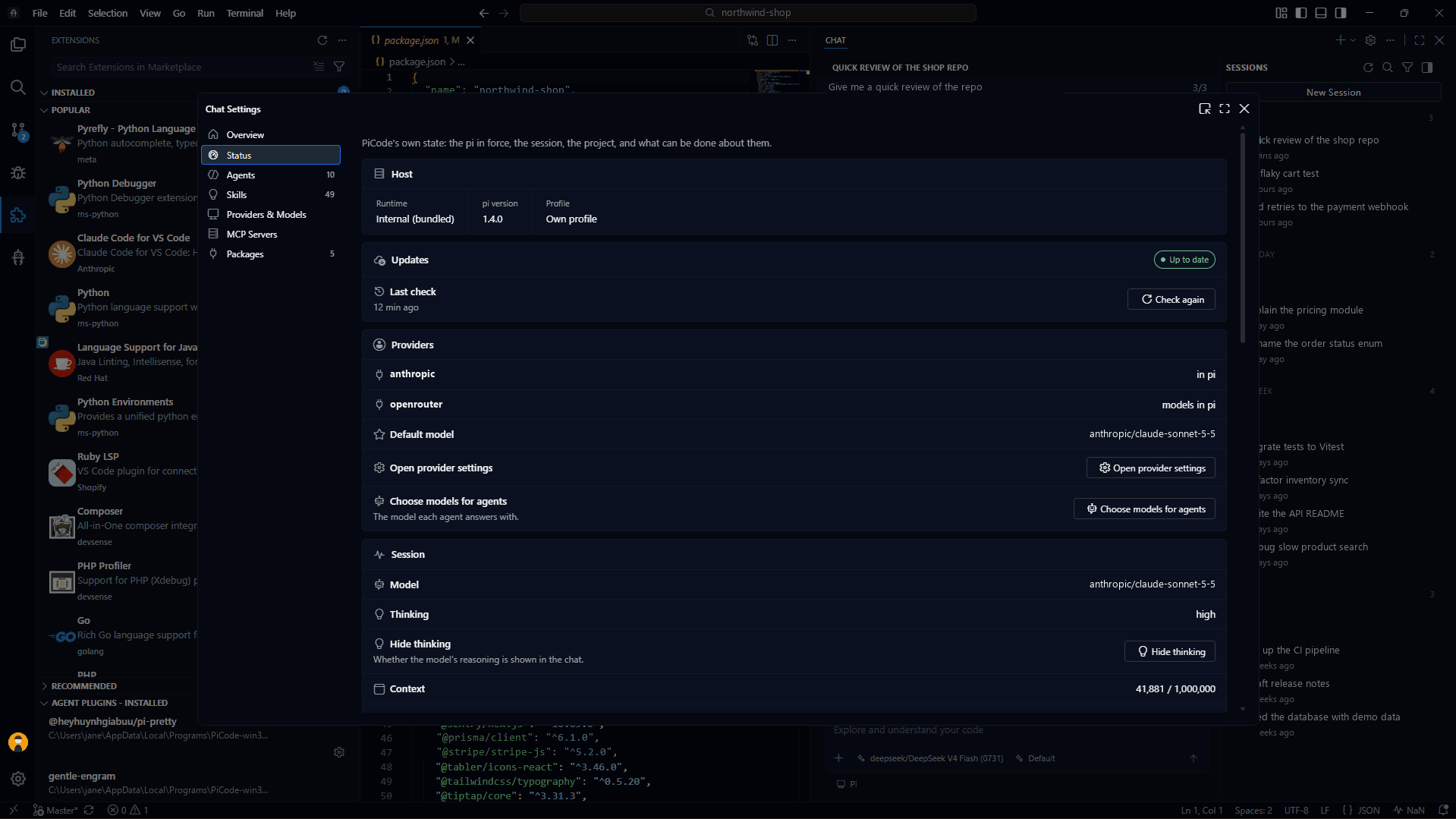
Which model is answering and how hard it is thinking, what the session has cost, the tokens and cache it has used, the jobs it has running in the background, and your project's branch and changes.
Your editor
A full code editor you already know how to use, set up in minutes and kept up to date from the inside.
Two ways to work
The Agent layout gives the chat the room: your sessions on the left, the conversation in the middle, the review in a bar on the right. The Editor layout is the VS Code you already know. Switch in a click — same files, same session, no restart.
Familiar by design
Built on the same foundation as VS Code: the layout, keybindings and shortcuts you already know, and extensions from the Open VSX catalogue.
Themes you can see first
A gallery that paints every theme in its real colours. Hover to try one on, click to keep it, and search Open VSX to install more from the same page.
Ready in five steps
A short first-run setup that opens in your computer's language: sign in if you want an account, choose which Pi answers (the built-in one or your own), connect a provider and a default model, pick your packages and a theme. Everything PiCode adds is translated into 13 languages, and you can review the setup at any time.
Local-first and private
Your files, conversations and settings are stored on your machine; only what you send to the model provider you chose leaves it. Telemetry is off: the only thing PiCode sends on its own is an anonymous update check (version and system), described in our Privacy Policy. Cloud sync is optional and needs a Pro account.
Updates from inside
PiCode tells you when an update is out and installs it with a click: the editor itself, and the agent with its packages. Downloads are signed, and if a new build does not start, the one that worked comes back on its own. Fixes, small steps and full releases share one version number, so you always know what you have. Choose Stable, or try what is coming on Beta and Experimental.
What's new, to try out
After an update, a window explains each novelty in plain words and tells you if it is free or Pro. Play with a small demo of each one, or press the button that does the real thing.
Open source
MIT-licensed and developed in the open. Read the code, file issues, and ship the features you need.
With PiCode Pro
Everything above is free. Pro adds the parts that run on our servers.
GitHub and Jira issues
See what was reported on the project you have open, right beside your code. Each folder shows its own repository or Jira space.
A real Jira board
The same columns as in Jira. Drag cards between them, or open an issue to change its type, priority, people, labels or description.
Fix it with the agent
One button writes the issue into a new chat for you to review. Nothing is sent until you say so, and a report from outside your team is marked as such.
Cloud sync you control
Your setup on every computer, encrypted. Turn each part on or off, and bring back your chats from the last 7 days.